Showing posts with label ODA upgrade. Show all posts

Thursday, August 15, 2024

Troubleshoot ODA Repo Issue


Intro 

If you found previous blog posts helpful for addressing ODA upgrade issues on virtualization platforms, the following article will ease your journey toward the 19.8 upgrade.

Article on Upgrades and Issues:


ODA virtualized upgrades are always challenging, with unexpected issues often arising. One consistent problem I've noticed in upgrades up to version 18.8.0.0 is the repository disappearing after a node reboot.

12.1.2.6 -> 12.1.2.10 
12.1.2.10 -> 12.1.2.12 
12.1.2.12 -> 18.3.0.0 
18.3.0.0 -> 18.8.0.0 
18.8.0.0 -> 19.8.0.0 
19.8.0.0 -> 19.13.0.0

In this article, I will elaborate on how you can overcome this repo issue. First, check the cluster VIP status.

Tuesday, September 14, 2021

Virtualized ODA upgrade 18.3.0.0 to 18.8.0.0 - Journey to 12.1.2.12 - 19.13.0.0 - Part 2


ODA upgrade 18.3.0.0 to 18.8.0.0


I expect the previous blog was useful for patching oda from 12.1.2.12 to 18.3.0.0. 

Our plan is to upgrade oda with the latest 12.1.2.12 to 19.13.0.0. Before moving to 19.13.0.0 we need to upgrade oda to 18.8.0.0. (Plan is there in ODA upgrade 12.1.2.12 to 18.3.0.0 -- Journey to 19.13.0.0 - Part 1).

This blog elaborates on the steps taken to patch virtualized oda from 18.3.0.0 to 18.8.0.0. ODA virtualized platform - X5 upgrade commands are orchestrated by oakcli utility.

The previous patching grid upgraded from 12C to 18C and that was the major upgrade. In this patching 18.8.0.0 applies grid PSU on top of the current 18c grid binary and there are few storage patches included in this upgrade.

This article is focused on 18.8.0.0 upgrade for X5 hardware platform.

How to find the hardware version.

Find hardware version:


[root@ecl-odabase-0 delshare]# oakcli show env_hw
VM-ODA_BASE ODA X5-2
[root@ecl-odabase-0 delshare]#


Patching plan :

12.1.2.12 - >  18.3.0.0 - complete
18.3.0.0  - >  18.8.0.0 - In - progress
18.8.0.0  - >  19.8.0.0 -
19.8.0.0  - >  19.9.0.0 -
To get an understanding please find the patching sequence below. 

Also make sure to run oakcli show disk to validate the disk status, if there are any disk failures address those disk failures before the patching.

###########  Patching sequnece

1. computenodes -ODA_BASE
2. storage
3. database - create new 18.8.0.0 home and move database to 18.8 or 
           upgrade oracle database with latest psu that comes with 18.8 bundle

############ Pre checkDisk status 
oakcli show disk

1. Preparation

1.1 Space requirement


First of all we need to ensure we have enough space on (root mount point ) /, /u01 and /opt file systems. At least 20 GB should be available. If not, we can do some cleaning or extend the LVM partitions to gain space.

df -h / /u01 /opt

[root@ecl-odabase-0 18.8.0.0]# df -h / /opt /u01
Filesystem      Size  Used Avail Use% Mounted on
/dev/xvda2       55G   33G   20G  63% /
/dev/xvdb1       92G   61G   27G  70% /u01
[root@ecl-odabase-0 18.8.0.0]#

Download the Oracle Database Appliance Server Patch for OAK Stack and Virtualized Platforms (patch 30518438)

Stage the patches in /u01 mount point and unpack the binaries.

# oakcli unpack -package /tmp/p30518438_188000_Linux-x86-64_1of2.zip
# oakcli unpack -package /tmp/p30518438_188000_Linux-x86-64_2of2.zip

/u01/PATCH
# oakcli unpack -package /u01/PATCH/18.8.0.0/p30518438_188000_Linux-x86-64_1of2.zip
# oakcli unpack -package /u01/PATCH/18.8.0.0/p30518438_188000_Linux-x86-64_2of2.zip
Please find the expected output after unpacking

expected output:

[root@ecl-odabase-0 18.8.0.0]# oakcli unpack -package /u01/PATCH/18.8.0.0/p30518438_188000_Linux-x86-64_1of2.zip
Unpacking will take some time,  Please wait...
Successfully unpacked the files to repository.

[root@ecl-odabase-0 18.8.0.0]# oakcli unpack -package /u01/PATCH/18.8.0.0/p30518438_188000_Linux-x86-64_2of2.zip
Unpacking will take some time,  Please wait...
Successfully unpacked the files to repository.
[root@ecl-odabase-0 18.8.0.0]#

Once the unpacking completes update the repository with the latest patches.

############ update repository with latest bundle patches 
oakcli update -patch 18.8.0.0.0 --verify

1.2 Backup ODA Base 


ODA_BASE backup can be taken from DOM0. Also, take the database full-back and VM backup before performing this upgrade activity.


- Take level zero backup of the running databases
- Backup the running vms
- Backup oda_base(domu) from dom0
2. Pre-Patching Steps

Before running the patching commands always make sure to check the pre patching report for os and components. If there are any major issues you can work with oracle to address these issues before patching.

2.1 OS post-validation steps  

Use below mentioned commands to validate the os upgrade. run this from both the nodes.
########## Validate ospatch
oakcli validate -c ospatch -ver 18.8.0.0.0
These commands use to validate the ODA components.

########## Validate from first node

oakcli validate -a

3. Patching 

 We will follow the below mentioned patching sequence. First start patching with compute nodes (oda_base), storage, and last database PSU.

###########  Patching sequnece
computenodes -ODA_BASE
storage
database - create new 18.8.0.0 home and move database to 18.8 or 
           upgrade oracle database with latest psu that comes with 18.8 bundle
First note down the running VM and the repo details. use the below commands to note down the running repo's.

[root@ecl-odabase-0 18.3.0.0]# oakcli show repo


          NAME                          TYPE            NODENUM  FREE SPACE     STATE           SIZE


          kali_test                     shared          0               N/A     OFFLINE         N/A

          kali_test                     shared          1               N/A     OFFLINE         N/A

          odarepo1                      local           0               N/A     N/A             N/A

          odarepo2                      local           1               N/A     N/A             N/A

          qualys                        shared          0               N/A     OFFLINE         N/A

          qualys                        shared          1               N/A     OFFLINE         N/A

          vmdata                        shared          0               N/A     OFFLINE         N/A

          vmdata                        shared          1            99.99%     ONLINE          4068352.0M

          vmsdev                        shared          0               N/A     OFFLINE         N/A

          vmsdev                        shared          1               N/A     UNKNOWN         N/A
          
Use below mentioned commands to note down running VMS.

[root@ecl-odabase-1 PATCH]# oakcli show vm

          NAME                                  NODENUM         MEMORY          VCPU            STATE           REPOSITORY

        kali_server                             0               4196M              2            UNKNOWN         kali_test
        qualyssrv                               0               4196M              2  
Note: 18.8 there is a bug for TFA : 

TFA – it should be stopped manually. before starting the patching process.

/etc/init.d/init.tfa stop
expected output (TFA):

[root@ecl-odabase-0 18.8.0.0]# /etc/init.d/init.tfa stop
Stopping TFA from init for shutdown/reboot
oracle-tfa stop/waiting
WARNING - TFA Software is older than 180 days. Please consider upgrading TFA to the latest version.
TFAmain Force Stopped Successfully : status mismatch
TFA Stopped Successfully
Killing TFA running with pid 19343
. . .
Successfully stopped TFA..
[root@ecl-odabase-0 18.8.0.0]#

[root@ecl-odabase-1 ~]# /etc/init.d/init.tfa stop
Stopping TFA from init for shutdown/reboot
oracle-tfa stop/waiting
WARNING - TFA Software is older than 180 days. Please consider upgrading TFA to the latest version.
TFA-00104 Cannot establish connection with TFA Server. Please check TFA Certificates
Killing TFA running with pid 10681
. . .
Successfully stopped TFA..
[root@ecl-odabase-1 ~]#

3.1 Patching ODA Base servers.


Run below mention patching command in screen terminal, so we do not want to panic about the connection disconnections. If the connection got interrupted during the patching window we can still attach the screen using screen -r.

screen
screen -ls -- screen terminal verification
script /tmp/odabase_upgrade_18800_19082021.txt - record all the steps 
/opt/oracle/oak/bin/oakcli update -patch 18.8.0.0.0 --server

3.2 Troubleshooting server patching issues

Patching failed due to grid pre-check failure. 
This is the error displayed in the terminal window.


 TFA-00002 Oracle Trace File Analyzer (TFA) is not running
 TFA-00002 Oracle Trace File Analyzer (TFA) is not running
 TFA-00002 Oracle Trace File Analyzer (TFA) is not running
 stop: Unknown instance:
 TFA-00002 Oracle Trace File Analyzer (TFA) is not running
 SUCCESS: 2021-08-17 15:14:55: Successfully update AHF rpm.
 INFO: 2021-08-17 15:14:55: ------------------Patching Grid-------------------------
 INFO: 2021-08-17 15:14:57: Clusterware is not running on local node
 INFO: 2021-08-17 15:14:57: Attempting to start clusterware and its resources on local
 node
 INFO: 2021-08-17 15:16:16: Successfully started the clusterware on local node

 INFO: 2021-08-17 15:16:16: Checking for available free space on /, /tmp, /u01
 INFO: 2021-08-17 15:16:16: Shutting down Clusterware and CRS on local node.
 INFO: 2021-08-17 15:16:16: Clusterware is running on local node
 INFO: 2021-08-17 15:16:16: Attempting to stop clusterware and its resources locally
 SUCCESS: 2021-08-17 15:17:18: Successfully stopped the clusterware on local node

 INFO: 2021-08-17 15:17:18: Shutting down CRS on the node...
 SUCCESS: 2021-08-17 15:17:21: Successfully stopped CRS processes on the node
 INFO: 2021-08-17 15:17:21: Checking for running CRS processes on the node.
 INFO: 2021-08-17 15:17:43: Starting up CRS and Clusterware on the node
 INFO: 2021-08-17 15:17:43: Starting up CRS on the node...
 SUCCESS: 2021-08-17 15:20:49: CRS has started on the node

 INFO: 2021-08-17 15:20:51: Running cluvfy to correct cluster state
 ERROR: 2021-08-17 15:24:49: Clusterware state is not NORMAL.
 ERROR: 2021-08-17 15:24:49: Failed to patch server (grid) component

error at Command = /usr/bin/ssh -l root ecl-odabase-1 /opt/oracle/oak/pkgrepos/System/18.8.0.0.0/bin/PatchDriver -tag 20210817140429 -server -version 18.8.0.0.0> and errnum=
ERROR  : Command = /usr/bin/ssh -l root ecl-odabase-1 /opt/oracle/oak/pkgrepos/System/18.8.0.0.0/bin/PatchDriver -tag 20210817140429 -server -version 18.8.0.0.0 did not complete successfully. Exit code 1 #Step -1#
Exiting...
ERROR: Unable to apply the patch 
oda patching and other logs are under /opt mount point , still patching is Log location : /opt/oracle/oak/log/ecl-odabase-0/patch/18.8.0.0.0

ecl-odabase-1: PRVG-11368 : A SCAN is recommended to resolve to "3" or more IP
                addresses, but SCAN "ecl-oda-scan" resolves to only
                "/10.11.30.48,/10.11.30.49"

 ecl-odabase-0: PRVG-11368 : A SCAN is recommended to resolve to "3" or more IP
                addresses, but SCAN "ecl-oda-scan" resolves to only
                "/10.11.30.48,/10.11.30.49"

   Verifying DNS/NIS name service 'ecl-oda-scan' ...FAILED
   PRVG-1101 : SCAN name "ecl-oda-scan" failed to resolve

 Verifying Clock Synchronization ...FAILED
   Verifying Network Time Protocol (NTP) ...FAILED
     Verifying NTP daemon is synchronized with at least one external time source
     ...FAILED
     ecl-odabase-1: PRVG-13602 : NTP daemon is not synchronized with any
                    external time source on node "ecl-odabase-1".

     ecl-odabase-0: PRVG-13602 : NTP daemon is not synchronized with any
                    external time source on node "ecl-odabase-0".


 CVU operation performed:      stage -post crsinst
 Date:                         Aug 17, 2021 3:20:55 PM
 CVU home:                     /u01/app/18.0.0.0/grid/
 User:                         grid

2021-08-17 15:24:49: Executing cmd: /u01/app/18.0.0.0/grid/bin/crsctl query crs activeversion -f
2021-08-17 15:24:49: Command output:
>  Oracle Clusterware active version on the cluster is [18.0.0.0.0]. The cluster upgrade state is [UPGRADE FINAL]. The cluster active patch level is [3769208751]. ,
>End Command output
2021-08-17 15:24:49: ERROR:  Clusterware state is not NORMAL.

Followed:How to resolve the cluster upgrade to state of [UPGRADE FINAL] after successfully upgrading Grid Infrastructure (GI) to 18c or higher (Doc ID 2583141.1)

The solution to address grid pre-patching issues.

######### Solution

1. Issue "/u01/app/18.0.0.0/grid/bin/cluvfy stage -post crsinst -gi_upgrade -n all"
2. Fix the critical errors that above command reports
3. Rerun "/u01/app/18.0.0.0/grid/bin/cluvfy stage -post crsinst -collect cluster -gi_upgrade -n all"
4. Issue "/u01/app/18.0.0.0/grid/bin/crsctl query crs activeversion -f" and confirm that the cluster upgrade state is [NORMAL].
5. If the above command still reports that the the cluster upgrade state is [UPGRADE FINAL], repeat steps 1 to 3 and fix all critical errors.

3 issues are to be addressed in this scenario.

  1.  NTP 
  2.  DNS issue 
  3.  only two scan addresses are configured.

3.2.1 Resolution for NTP

In this environment we do not have an NTP server, so the only possibility is to use cluster network time. To use the in-build cluster network time feature we need to mv the NTP configuration files and start the cluster using the in-build network feature.


mv /etc/ntp.conf /etc/ntp.conf.ori
rm /var/run/ntpd.pid
crsctl start crs

3.2.2 Resolution for DNS issue 

 In this scenario, we do not have DNS server, so the plan is to use /etc/hosts file as an alternative. add required IP address in the /etc/hosts file in both servers. The first comment to resolve conf entry, if not cluster we try to resolve the IP address for DNS server.

[root@ecl-odabase-0 18.8.0.0]# cat /etc/resolv.conf

# Following added by OneCommand
search newco.local
#nameserver 10.11.30.254
# End of section
[root@ecl-odabase-0 18.8.0.0]#

[oracle@ecl-odabase-0 gg_191004]$ cat /etc/hosts


# Following added by OneCommand
127.0.0.1    localhost.localdomain localhost

# PUBLIC HOSTNAMES

# PRIVATE HOSTNAMES
192.168.16.27    ecl-oda-lab1-priv0.newco.local    ecl-oda-lab1-priv0
192.168.16.28    ecl-oda-lab2-priv0.newco.local    ecl-oda-lab2-priv0

# NET(0-3) HOSTNAMES
10.11.30.155    ecl-odabase-0.newco.local ecl-odabase-0
10.11.30.156    ecl-odabase-1.newco.local ecl-odabase-1

# VIP HOSTNAMES
10.11.30.157    ecl-oda-0-vip.newco.local  ecl-oda-0-vip
10.11.30.158    ecl-oda-1-vip.newco.local  ecl-oda-1-vip

# Below are SCAN IP addresses for reference.
# SCAN_IPS=(10.11.30.48 10.11.30.49)
10.11.30.48     ecl-oda-scan.newco.local  ecl-oda-scan
10.11.30.49     ecl-oda-scan.newco.local  ecl-oda-scan
10.11.30.50     ecl-oda-scan.newco.local  ecl-oda-scan

10.11.30.105  eclipsys-noc.localdomain          eclipsys-noc
[oracle@ecl-odabase-0 gg_191004]$

3.2.3 Resolution for missing scan address. 

 In this environment, we had only 2 scans of IP addresses. so we need to configure a new scan address. Check with your network team member and obtain IP address from the same scan range. This environment scan address is 10.11.30.50, Once you add this on both the nodes run below-mentioned commands to discover the new scan address.

/u01/app/18.0.0.0/grid/bin/srvctl modify scan -n ecl-oda-scan
Now run config commands to verify

[root@ecl-odabase-0 ~]# /u01/app/18.0.0.0/grid/bin/srvctl config scan
SCAN name: ecl-oda-scan, Network: 1
Subnet IPv4: 10.11.30.0/255.255.255.0/eth0, static
Subnet IPv6:
SCAN 1 IPv4 VIP: 10.11.30.48
SCAN VIP is enabled.
SCAN VIP is individually enabled on nodes:
SCAN VIP is individually disabled on nodes:
SCAN 2 IPv4 VIP: 10.11.30.49
SCAN VIP is enabled.
SCAN VIP is individually enabled on nodes:
SCAN VIP is individually disabled on nodes:
SCAN 3 IPv4 VIP: 10.11.30.50
SCAN VIP is enabled.
Once it’s discovered make sure to check the scan listener status and start the newly configured scan.

[root@ecl-odabase-0 ~]# srvctl status scan_listener
SCAN Listener LISTENER_SCAN1 is enabled
SCAN listener LISTENER_SCAN1 is running on node ecl-odabase-1
SCAN Listener LISTENER_SCAN2 is enabled
SCAN listener LISTENER_SCAN2 is running on node ecl-odabase-0
SCAN Listener LISTENER_SCAN3 is enabled
SCAN listener LISTENER_SCAN3 is not running
[root@ecl-odabase-0 ~]#
So now time to verify the cluster post-check again. If there are any issues we need to address those before patching.

/u01/app/18.0.0.0/grid/bin/cluvfy stage -post crsinst -collect cluster -gi_upgrade -n all
When there are no more cluster issues, we can start the patching again using the below commands which is already mentioned in the chapter (3.1 Patching ODA base server)

script /tmp/odabase_upgrade_18800_19082021.txt - record all the steps 
/opt/oracle/oak/bin/oakcli update -patch 18.8.0.0.0 --server

3.3 Server patching failed on ilom 


 Again we faced an obstacle on server patching, this time it failed on ilom patching.

Note: We faced this error while performing the ODA patch for 18.3 - 18.8 upgrade and node01

Error:
ERROR  : Ran '/usr/bin/scp  root@192.168.16.28:/opt/oracle/oak/install/oakpatch_summary /opt/oracle/oak/install/oakpatch_summary' and it returned code(1) and output is:
         ssh: connect to host 192.168.16.28 port 22: Connection timed out

INFO: Infrastructure patching summary on node: 192.168.16.28

INFO: Running post-install scripts
INFO: Running postpatch on node 1...
ERROR  : Ran '/usr/bin/ssh -l root 192.168.16.28 /opt/oracle/oak/pkgrepos/System/18.8.0.0.0/bin/postpatch -v 18.8.0.0.0 --infra --gi -tag 20210819112727' and it returned code(255) and output is:
         ssh: connect to host 192.168.16.28 port 22: Connection timed out

error at  --gi="" --infra="" -l="" -tag="" -v="" 18.8.0.0.0="" 192.168.16.28="" 20210819112727="" bin="" oak="" opt="" oracle="" pkgrepos="" postpatch="" root="" ssh="" usr="" ystem=""> and errnum=
ERROR  : Command = /usr/bin/ssh -l root 192.168.16.28 /opt/oracle/oak/pkgrepos/System/18.8.0.0.0/bin/postpatch -v 18.8.0.0.0 --infra --gi -tag 20210819112727 did not complete successfully. Exit code 255 #Step -1#
Exiting...
ERROR: Unable to apply the patch 

3.3.1 ILOM patching solution

Only solution is to restart the oda_base and dom0 from ilom console , after reboot please check the oda components.

loging to ilom and power cycle the node 01 server.
### verify the component version once the node is fully up 
oakcli show version -detail
Validation output


========================
18.8 After pacthing 
========================
#### Node 01

[root@ecl-odabase-0 ~]# oakcli show version -detail
Reading the metadata. It takes a while...

System Version  Component Name            Installed Version         Supported Version
--------------  ---------------           ------------------        -----------------
18.8.0.0.0
                Controller_INT            4.650.00-7176             Up-to-date
                Controller_EXT            13.00.00.00               Up-to-date
                Expander                  0018                      001E
                SSD_SHARED {
                [ c1d20,c1d21,c1d22,      A29A                      Up-to-date
                c1d23,c1d44,c1d45,c1
                d46,c1d47 ]
                [ c1d16,c1d17,c1d18,      A29A                      Up-to-date
                c1d19,c1d40,c1d41,c1
                d42,c1d43 ]
                             }
                HDD_LOCAL                 A7E0                      Up-to-date
                HDD_SHARED {
                [ c1d0,c1d1,c1d2,c1d      PAG1                      PD51
                3,c1d4,c1d5,c1d6,c1d
                7,c1d8,c1d9,c1d10,c1
                d11,c1d12,c1d13,c1d1
                4,c1d15,c1d28 ]
                [ c1d24,c1d25,c1d26,      A3A0                      Up-to-date
                c1d27,c1d29,c1d30,c1
                d31,c1d32,c1d33,c1d3
                4,c1d35,c1d36,c1d37,
                c1d38,c1d39 ]
                             }
                ILOM                      4.0.4.52 r132805          Up-to-date
                BIOS                      30300200                  Up-to-date
                IPMI                      1.8.15.0                  Up-to-date
                HMP                       2.4.5.0.1                 Up-to-date
                OAK                       18.8.0.0.0                Up-to-date
                OL                        6.10                      Up-to-date
                OVM                       3.4.4                     Up-to-date
                GI_HOME                   18.8.0.0.191015           Up-to-date
                DB_HOME                   12.1.0.2.180717           12.1.0.2.191015
[root@ecl-odabase-0 ~]#

3.4 Troubleshoot shared repo start-up issues.


On completion, we noticed that shared repositories were not coming up due havip startup issues. Because all the exportfs mount points were missing from the cluster.

Dom0 mount points are mounted as NFS share and dynamic entries created under /etc/mtab were missing.
Please find the sample /etc/mtab entry for your perusal.
/dev/sda3 / ext3 rw 0 0
proc /proc proc rw 0 0
sysfs /sys sysfs rw 0 0
devpts /dev/pts devpts rw,gid=5,mode=620 0 0
/dev/sda2 /OVS ext3 rw 0 0
/dev/sda1 /boot ext3 rw 0 0
tmpfs /dev/shm tmpfs rw 0 0
debugfs /sys/kernel/debug debugfs rw 0 0
xenfs /proc/xen xenfs rw 0 0
none /proc/sys/fs/binfmt_misc binfmt_misc rw 0 0
sunrpc /var/lib/nfs/rpc_pipefs rpc_pipefs rw 0 0
none /var/lib/xenstored tmpfs rw 0 0
192.168.18.21:/u01/app/sharedrepo/vmstor1 /OVS/Repositories/vmstor1 nfs rw,bg,hard,nointr,rsize=32768,wsize=32768,tcp,actimeo=0,nfsvers=3,timeo=600,addr=192.168.18.21 0 0
[root@pinode0 ~]#
This shared-repo issue is recorded under the know issues section, But we found this slight difference because the repo is not mounted on the dom0 server. 

https://docs.oracle.com/en/engineered-systems/oracle-database-appliance/18.8/cmtrn/issues-with-oda-odacli.html#GUID-5BA56322-127F-424F-8D1E-DEB3939CD60C


### verify the component version once the node is fully up 
oakcli show version -detail
Validation output

========================
18.8 After pacthing 
========================
#### Node 01

[root@ecl-odabase-0 ~]# oakcli show version -detail
Reading the metadata. It takes a while...

System Version  Component Name            Installed Version         Supported Version
--------------  ---------------           ------------------        -----------------
18.8.0.0.0
                Controller_INT            4.650.00-7176             Up-to-date
                Controller_EXT            13.00.00.00               Up-to-date
                Expander                  0018                      001E
                SSD_SHARED {
                [ c1d20,c1d21,c1d22,      A29A                      Up-to-date
                c1d23,c1d44,c1d45,c1
                d46,c1d47 ]
                [ c1d16,c1d17,c1d18,      A29A                      Up-to-date
                c1d19,c1d40,c1d41,c1
                d42,c1d43 ]
                             }
                HDD_LOCAL                 A7E0                      Up-to-date
                HDD_SHARED {
                [ c1d0,c1d1,c1d2,c1d      PAG1                      PD51
                3,c1d4,c1d5,c1d6,c1d
                7,c1d8,c1d9,c1d10,c1
                d11,c1d12,c1d13,c1d1
                4,c1d15,c1d28 ]
                [ c1d24,c1d25,c1d26,      A3A0                      Up-to-date
                c1d27,c1d29,c1d30,c1
                d31,c1d32,c1d33,c1d3
                4,c1d35,c1d36,c1d37,
                c1d38,c1d39 ]
                             }
                ILOM                      4.0.4.52 r132805          Up-to-date
                BIOS                      30300200                  Up-to-date
                IPMI                      1.8.15.0                  Up-to-date
                HMP                       2.4.5.0.1                 Up-to-date
                OAK                       18.8.0.0.0                Up-to-date
                OL                        6.10                      Up-to-date
                OVM                       3.4.4                     Up-to-date
                GI_HOME                   18.8.0.0.191015           Up-to-date
                DB_HOME                   12.1.0.2.180717           12.1.0.2.191015
[root@ecl-odabase-0 ~]#


Error log :

########## Error

####################### DOM 0 NODE01
2021-08-30 12:19:41,201 [Cmd_EnvId] [MainThread] [repoactions] [INFO] [162] Checking for shared repos
2021-08-30 12:19:44,228 [Cmd_EnvId] [MainThread] [repoactions] [ERROR] [182] Error encountered while checking for shared repos: OAKERR:7084The HAVIP 192.168.18.21 is not pingable
2021-08-30 12:19:44,230 [Cmd_EnvId] [MainThread] [agentutils] [DEBUG] [181] Created xml string 0OAKERR:7084The HAVIP 192.168.18.21 is not pingable
2021-08-30 12:19:59,169 [Cmd_EnvId] [MainThread] [repoactions] [INFO] [162] Checking for shared repos
2021-08-30 12:20:02,193 [Cmd_EnvId] [MainThread] [repoactions] [ERROR] [182] Error encountered while checking for shared repos: OAKERR:7084The HAVIP 192.168.18.21 is not pingable
2021-08-30 12:20:02,194 [Cmd_EnvId] [MainThread] [agentutils] [DEBUG] [181] Created xml string 0OAKERR:7084The HAVIP 192.168.18.21 is not pingable

####################### DOM 0 NODE02
2021-08-30 12:30:16,328 [Cmd_EnvId] [MainThread] [repoactions] [INFO] [162] Checking for shared repos
2021-08-30 12:30:19,364 [Cmd_EnvId] [MainThread] [repoactions] [ERROR] [182] Error encountered while checking for shared repos: OAKERR:7084The HAVIP 192.168.19.21 is not pingable
2021-08-30 12:30:19,366 [Cmd_EnvId] [MainThread] [agentutils] [DEBUG] [181] Created xml string 0OAKERR:7084The HAVIP 192.168.19.21 is not pingable
2021-08-30 12:31:36,167 [Cmd_EnvId] [MainThread] [repoactions] [INFO] [162] Checking for shared repos
2021-08-30 12:31:39,188 [Cmd_EnvId] [MainThread] [repoactions] [ERROR] [182] Error encountered while checking for shared repos: OAKERR:7084The HAVIP 192.168.19.21 is not pingable
2021-08-30 12:31:39,189 [Cmd_EnvId] [MainThread] [agentutils] [DEBUG] [181] Created xml string 0OAKERR:7084The HAVIP 192.168.19.21 is not pingable
2021-08-30 12:32:53,686 [Cmd_EnvId] [MainThread] [repoactions] [INFO] [162] Checking for shared repos

Secondly, check the acfsmount point status using below mention command.


[root@ecl-odabase-0 ~]# /sbin/acfsutil registry -l
Device : /dev/asm/datastore-37 : Mount Point : /u02/app/oracle/oradata/datastore : Options : none : Nodes : all : Disk Group: DATA : Primary Volume : DATASTORE : Accelerator Volumes :
Device : /dev/asm/datcdbdev-37 : Mount Point : /u02/app/oracle/oradata/datcdbdev : Options : none : Nodes : all : Disk Group: DATA : Primary Volume : DATCDBDEV : Accelerator Volumes :
Device : /dev/asm/kali_test-37 : Mount Point : /u01/app/sharedrepo/kali_test : Options : none : Nodes : all : Disk Group: DATA : Primary Volume : KALI_TEST : Accelerator Volumes :
Device : /dev/asm/qualys-37 : Mount Point : /u01/app/sharedrepo/qualys : Options : none : Nodes : all : Disk Group: DATA : Primary Volume : QUALYS : Accelerator Volumes :
Device : /dev/asm/vmdata-37 : Mount Point : /u01/app/sharedrepo/vmdata : Options : none : Nodes : all : Disk Group: DATA : Primary Volume : VMDATA : Accelerator Volumes :
Device : /dev/asm/flashdata-216 : Mount Point : /u02/app/oracle/oradata/flashdata : Options : none : Nodes : all : Disk Group: FLASH : Primary Volume : FLASHDATA : Accelerator Volumes :
Device : /dev/asm/datastore-445 : Mount Point : /u01/app/oracle/fast_recovery_area/datastore : Options : none : Nodes : all : Disk Group: RECO : Primary Volume : DATASTORE : Accelerator Volumes :
Device : /dev/asm/db_backup-445 : Mount Point : /db_backup : Options : none : Nodes : all : Disk Group: RECO : Primary Volume : DB_BACKUP : Accelerator Volumes :
Device : /dev/asm/delshare-445 : Mount Point : /delshare : Options : none : Nodes : all : Disk Group: RECO : Primary Volume : DELSHARE : Accelerator Volumes :
Device : /dev/asm/prdmgtshare-445 : Mount Point : /prdmgtshare : Options : none : Nodes : all : Disk Group: RECO : Primary Volume : PRDMGTSHARE : Accelerator Volumes :
Device : /dev/asm/rcocdbdev-445 : Mount Point : /u01/app/oracle/fast_recovery_area/rcocdbdev : Options : none : Nodes : all : Disk Group: RECO : Primary Volume : RCOCDBDEV : Accelerator Volumes :
Device : /dev/asm/vmsdev-445 : Mount Point : /u01/app/sharedrepo/vmsdev : Options : none : Nodes : all : Disk Group: RECO : Primary Volume : VMSDEV : Accelerator Volumes :
Device : /dev/asm/datastore-158 : Mount Point : /u01/app/oracle/oradata/datastore : Options : none : Nodes : all : Disk Group: REDO : Primary Volume : DATASTORE : Accelerator Volumes :
Device : /dev/asm/rdocdbdev-158 : Mount Point : /u01/app/oracle/oradata/rdocdbdev : Options : none : Nodes : all : Disk Group: REDO : Primary Volume : RDOCDBDEV : Accelerator Volumes :
If all the acfs mount points are mounted check the cluster status

root@ecl-odabase-0 ~]# /u01/app/18.0.0.0/grid/bin/crsctl status res -t -init
--------------------------------------------------------------------------------
Name           Target  State        Server                   State details
--------------------------------------------------------------------------------
Cluster Resources
--------------------------------------------------------------------------------
ora.asm
      1        ONLINE  ONLINE       ecl-odabase-0            STABLE
ora.cluster_interconnect.haip
      1        ONLINE  ONLINE       ecl-odabase-0            STABLE
ora.crf
      1        ONLINE  ONLINE       ecl-odabase-0            STABLE
ora.crsd
      1        ONLINE  ONLINE       ecl-odabase-0            STABLE
ora.cssd
      1        ONLINE  ONLINE       ecl-odabase-0            STABLE
ora.cssdmonitor
      1        ONLINE  ONLINE       ecl-odabase-0            STABLE
ora.ctssd
      1        ONLINE  ONLINE       ecl-odabase-0            OBSERVER,STABLE
ora.diskmon
      1        OFFLINE OFFLINE                               STABLE
ora.drivers.acfs
      1        ONLINE  ONLINE       ecl-odabase-0            STABLE
ora.drivers.oka
      1        OFFLINE OFFLINE                               STABLE
ora.evmd
      1        ONLINE  ONLINE       ecl-odabase-0            STABLE
ora.gipcd
      1        ONLINE  ONLINE       ecl-odabase-0            STABLE
ora.gpnpd
      1        ONLINE  ONLINE       ecl-odabase-0            STABLE
ora.mdnsd
      1        ONLINE  ONLINE       ecl-odabase-0            STABLE
ora.storage
      1        ONLINE  ONLINE       ecl-odabase-0            STABLE
--------------------------------------------------------------------------------
[root@ecl-odabase-0 ~]# ps -ef | grep pmon
Check the havip status and it shows the exportfs are not mounted.

####### HAVIP issue 

-- as root
/u01/app/18.0.0.0/grid/bin/srvctl config havip

[grid@ecl-odabase-0 trace]$ /u01/app/18.0.0.0/grid/bin/srvctl start havip -id havip_3 -n ecl-odabase-0
PRCE-1026 : Cannot start HAVIP resource without an Export FS resource.

Now let's check the log file for oda_base. This is where you can find the actual problem.

Log file : /opt/oracle/oak/log//odabaseagent/odabaseagent* Error message below:

 OAKERR8038 The filesystem could not be exported as a crs resource  
OAKERR:5015 Start repo operation has been disabled by flag

We can validate the mount nfs shares using under mention command.

showmount -e

3.4.1 Solution for shared repo issue.


 Let’s enable the shared repo from oda_base and start the reboot of the cluster in a rolling fashion. The better option is to stop the cluster and reboot the nodes from ilom.

 Meta Link note: Shared Repo Startup Fails with OAKERR:8038 and OAKERR:5015 on ODA 12.2.1.2.0 (Doc ID 2379347.1) 

 Known issues Link :

 https://docs.oracle.com/en/engineered-systems/oracle-database-appliance/18.8/cmtrn/issues-with-oda-odacli.html#GUID-5BA56322-127F-424F-8D1E-DEB3939CD60C

 [root@ecl-odabase-0 ~]# oakcli enable startrepo -node 0
Start repo operation is now ENABLED on node 0
[root@ecl-odabase-0 ~]# oakcli enable startrepo -node 1
Start repo operation is now ENABLED on node 1
[root@ecl-odabase-0 ~]#
 
oakcli show repo

Now only two components are left to patch 
  1.  Storage 
  2.  Database


3.5 Storage patching

Before storage patching makes sure to stop VM and repo's. 

script /tmp/output_storage_08202021.txt
/opt/oracle/oak/bin/oakcli update -patch version --storage

/opt/oracle/oak/bin/oakcli update -patch 18.8.0.0.0 --storage
Run below-mentioned command for verification.

===============================
After verification
===============================

[root@ecl-odabase-0 ~]# oakcli show version -detail
Reading the metadata. It takes a while...
System Version  Component Name            Installed Version         Supported Version
--------------  ---------------           ------------------        -----------------
18.8.0.0.0
                Controller_INT            4.650.00-7176             Up-to-date
                Controller_EXT            13.00.00.00               Up-to-date
                Expander                  001E                      Up-to-date
                SSD_SHARED {
                [ c1d20,c1d21,c1d22,      A29A                      Up-to-date
                c1d23,c1d44,c1d45,c1
                d46,c1d47 ]
                [ c1d16,c1d17,c1d18,      A29A                      Up-to-date
                c1d19,c1d40,c1d41,c1
                d42,c1d43 ]
                             }
                HDD_LOCAL                 A7E0                      Up-to-date
                HDD_SHARED {
                [ c1d24,c1d25,c1d26,      A3A0                      Up-to-date
                c1d27,c1d29,c1d30,c1
                d31,c1d32,c1d33,c1d3
                4,c1d35,c1d36,c1d37,
                c1d38,c1d39 ]
                [ c1d0,c1d1,c1d2,c1d      PD51                      Up-to-date
                3,c1d4,c1d5,c1d6,c1d
                7,c1d8,c1d9,c1d10,c1
                d11,c1d12,c1d13,c1d1
                4,c1d15,c1d28 ]
                             }
                ILOM                      4.0.4.52 r132805          Up-to-date
                BIOS                      30300200                  Up-to-date
                IPMI                      1.8.15.0                  Up-to-date
                HMP                       2.4.5.0.1                 Up-to-date
                OAK                       18.8.0.0.0                Up-to-date
                OL                        6.10                      Up-to-date
                OVM                       3.4.4                     Up-to-date
                GI_HOME                   18.8.0.0.191015           Up-to-date
                DB_HOME                   12.1.0.2.180717           12.1.0.2.191015
[root@ecl-odabase-0 ~]#

4. Post Patching Validation


Once this patching is complete. Validate the oda environment as mentioned below.
ps -ef | grep pmon - check database is up and running


ps -ef | grep pmon 
grid     22358     1  0 Sep10 ?        00:00:17 asm_pmon_+ASM1
grid     26041     1  0 Sep10 ?        00:00:17 apx_pmon_+APX1
oracle   93837     1  0 Sep13 ?        00:00:05 ora_pmon_clonedb1
root     98071 97908  0 14:02 pts/0    00:00:00 grep pmon

Also, execute oakcli show repo commands to validate running shared repositories and oakcli show vm to validate running VMS.


[root@ecl-odabase-0 ~]# oakcli show repo

          NAME                          TYPE            NODENUM  FREE SPACE     STATE           SIZE


          kali_test                     shared          0            94.74%     ONLINE          512000.0M

          kali_test                     shared          1            94.74%     ONLINE          512000.0M

          odarepo1                      local           0               N/A     N/A             N/A

          odarepo2                      local           1               N/A     N/A             N/A

          qualys                        shared          0            98.35%     ONLINE          204800.0M

          qualys                        shared          1            98.35%     ONLINE          204800.0M

          vmdata                        shared          0            99.99%     ONLINE          4068352.0M

          vmdata                        shared          1            99.99%     ONLINE          4068352.0M

          vmsdev                        shared          0            99.99%     ONLINE          1509376.0M

          vmsdev                        shared          1            99.99%     ONLINE 


[root@ecl-odabase-0 ~]# oakcli show vm

          NAME                                  NODENUM         MEMORY          VCPU            STATE           REPOSITORY

        kali_server                             0               4196M              2            OFFLINE         kali_test
        qualyssrv                               0               4196M              2  

Monday, August 23, 2021

ODA upgrade 12.1.2.12 to 18.3.0.0 -- Journey to 19.9.0.0 - Part 1

ODA upgrade 12.1.2.12 to 18.3.0.0


There are two options to upgrade ODA to the latest version.

1. re-image system with the latest binary -

    re-imaging ODA is required to re-create the whole structure of your environment and it’s complicated

2. Upgrade from 12.1.2.12 - 18.3.0.0.

I have tried to cover as many issues as possible to make this upgrade smooth. Okay, let's try to get ready for the challenge.

 As a first step, we will gather all the required details about the ODA environment. It’s very important to understand the environment. Then can only get ready with patching plan.

This is just the start of moving to 19.9.0.0. We found this below mention plan from looking at the oracle documents link.

Eg: server version, hardware version and its bare metal or virtual environment.

Section 1: Gather ODA server information

Find the ODA hardware version.


######### Find ODA version:
[root@ecl-oda-DOM0-0 ~]# ipmitool sunoem cli 'show System' | grep model
        model = ODA X5-2
        component_model = ORACLE SERVER X5-2
[root@ecl-oda-DOM0-0 ~]#
 
[root@ecl-oda-DOM0-1 ~]# ps -ef | grep pmon
root      5577  4433  0 13:57 pts/2    00:00:00 grep pmon
[root@ecl-oda-DOM0-1 ~]# ipmitool sunoem cli 'show System' | grep model
        model = ODA X5-2
        component_model = ORACLE SERVER X5-2
[root@ecl-oda-DOM0-1 ~]
Find Server version:

[root@ecl-odabase-0 delshare]# oakcli show server
 
        Power State              : On
        Open Problems            : 0
        Model                    : ODA X5-2
        Type                     : Rack Mount
        Part Number              : 33765810+1+1
        Serial Number            : 1535NMF006
        Primary OS               : Not Available
        ILOM Address             : 10.11.99.202
        ILOM MAC Address         : 00:10:E0:8D:5E:AC
        Description              : Oracle Database Appliance X5-2 1535NMF006
        Locator Light            : Off
        Actual Power Consumption : 288 watts
        Ambient Temperature      : 15.750 degree C
        Open Problems Report     : System is healthy


[root@ecl-odabase-0 delshare]# oakcli show server

        Power State              : On
        Open Problems            : 0
        Model                    : ODA X5-2
        Type                     : Rack Mount
        Part Number              : 33765810+1+1
        Serial Number            : 1535NMF006
        Primary OS               : Not Available
        ILOM Address             : 10.11.99.202
        ILOM MAC Address         : 00:10:E0:8D:5E:AC
        Description              : Oracle Database Appliance X5-2 1535NMF006
        Locator Light            : Off
        Actual Power Consumption : 288 watts
        Ambient Temperature      : 15.750 degree C
        Open Problems Report     : System is healthy
Find hardware version:
[root@ecl-odabase-0 delshare]# oakcli show env_hw
VM-ODA_BASE ODA X5-2
[root@ecl-odabase-0 delshare]#
Check for running vm’s and repositories :
If the environment is virtualized you will need to note down the vm names and repository names before patching.
These repositories are ACFS mount points , which stores allocated to store virtual machine and virtual disks.
=======================================
Check the running VMS and respository
=======================================


[root@ecl-odabase-0 PATCH]# oakcli show vm

          NAME                                  NODENUM         MEMORY          VCPU            STATE           REPOSITORY

        kali_server                             0               4196M              2            ONLINE          kali_test
        qualyssrv                               0               4196M              2            ONLINE          qualys


[root@ecl-odabase-0 PATCH]#


[root@ecl-odabase-0 PATCH]# oakcli show repo

          NAME                          TYPE            NODENUM  FREE SPACE     STATE           SIZE


          kali_test                     shared          0            94.78%     ONLINE          512000.0M

          kali_test                     shared          1            94.78%     ONLINE          512000.0M

          odarepo1                      local           0               N/A     N/A             N/A

          odarepo2                      local           1               N/A     N/A             N/A

          qualys                        shared          0            98.44%     ONLINE          204800.0M

          qualys                        shared          1            98.44%     ONLINE          204800.0M

          vmdata                        shared          0            99.99%     ONLINE          4068352.0M

          vmdata                        shared          1               N/A     UNKNOWN         N/A

          vmsdev                        shared          0            99.99%     ONLINE          1509376.0M

          vmsdev                        shared          1               N/A     UNKNOWN         N/A


before downloading and getting ready for patching we need to find what is the oda version.

This is very important steps for patch preparation.


########### Check running ODA details 

[root@ecl-odabase-0 PATCH]# oakcli show version -detail
Reading the metadata. It takes a while...
System Version  Component Name            Installed Version         Supported Version
--------------  ---------------           ------------------        -----------------
12.1.2.12.0
                Controller_INT            4.650.00-7176             Up-to-date
                Controller_EXT            13.00.00.00               Up-to-date
                Expander                  0018                      Up-to-date
                SSD_SHARED {
                [ c1d20,c1d21,c1d22,      A29A                      Up-to-date
                c1d23,c1d44,c1d45,c1
                d46,c1d47 ]
                [ c1d16,c1d17,c1d18,      A29A                      Up-to-date
                c1d19,c1d40,c1d41,c1
                d42,c1d43 ]
                             }
                HDD_LOCAL                 A7E0                      Up-to-date
                HDD_SHARED {
                [ c1d0,c1d1,c1d2,c1d      PAG1                      Up-to-date
                3,c1d4,c1d5,c1d6,c1d
                7,c1d8,c1d9,c1d10,c1
                d11,c1d12,c1d13,c1d1
                4,c1d15,c1d28 ]
                [ c1d24,c1d25,c1d26,      A3A0                      Up-to-date
                c1d27,c1d29,c1d30,c1
                d31,c1d32,c1d33,c1d3
                4,c1d35,c1d36,c1d37,
                c1d38,c1d39 ]
                             }
                ILOM                      3.2.9.23 r116695          Up-to-date
                BIOS                      30110000                  Up-to-date
                IPMI                      1.8.12.4                  Up-to-date
                HMP                       2.3.5.2.8                 Up-to-date
                OAK                       12.1.2.12.0               Up-to-date
                OL                        6.8                       Up-to-date
                OVM                       3.4.3                     Up-to-date
                GI_HOME                   12.1.0.2.170814(2660      Up-to-date
                                          9783,26609945)
                DB_HOME                   12.1.0.2.170814(2660      Up-to-date
                                          9783,26609945)
[root@ecl-odabase-0 PATCH]#

Section 2: Patching preparation steps

ODA patching you have to follow the http://docs.oracle.com .

There is no meta link note that covers all the patching steps.

go to http://docs.oracle.com and navigate engineered system page.


Then select the Oracle Database Appliance :


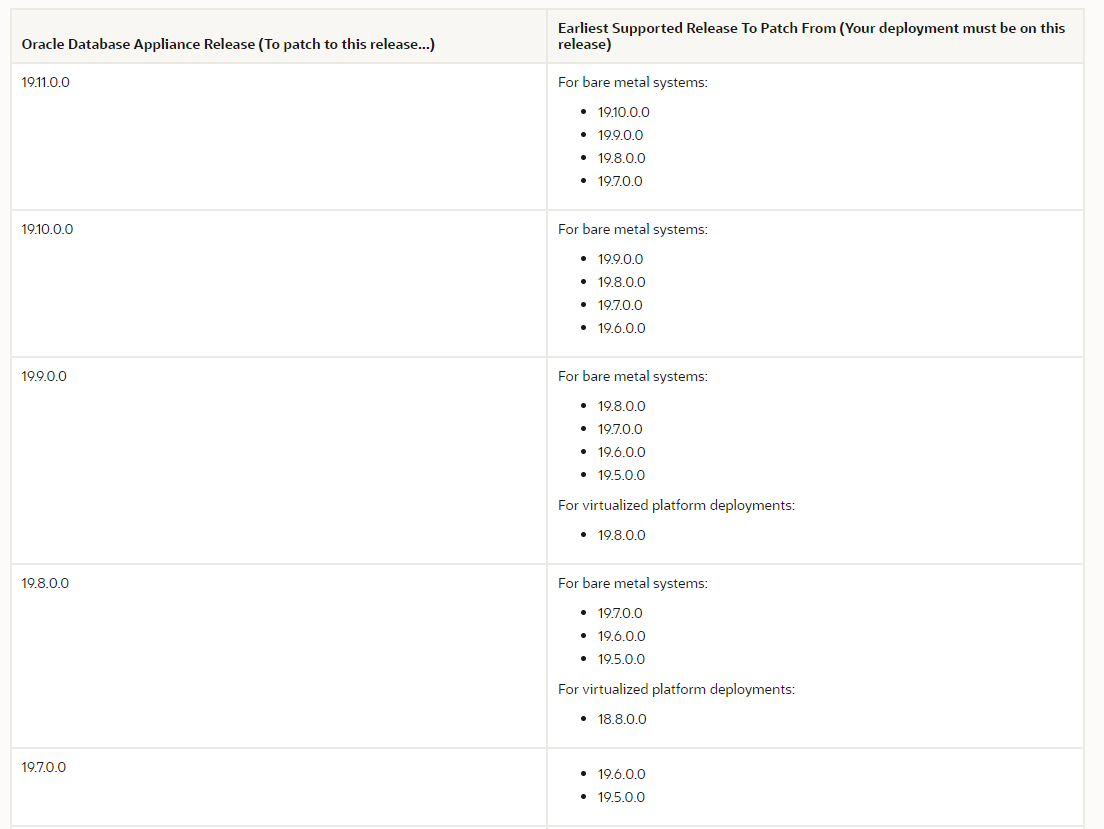
Navigate earlier release pages to find out the patching plan from 19.11 document, our plan is to upgrade ODA to 12.1.2.12 - 19.8.0.0.


This is how we can get 19.9.0.0 from 12.1.2.12.

12.1.2.12 - > 18.3.0.0
18.3.0.0 - > 18.8.0.0
18.8.0.0 - > 19.8.0.0
19.8.0.0 - > 19.9.0.0

Left column shows the patch version , right column shows from version we should be in to upgrade ODA.

Table 3-1 Minimum Patch Requirements for Oracle Database Appliance Releases


Now plan is to upgrade ODA 12.1.2.12 to 18.3.0.0. steps are there in 18.3

document section.


18.3 patches can be download from below mention link https://updates.oracle.com/Orion/PatchDetails/process_form?patch_num=28864520

2.1 Address known issues.

Always go and check the known issue pages for 18.3 , For this patching we have to apply acfs patch before starting the patching.

We need to apply patch 29608813 before upgrading ODA to 18.3 as proactive action to avoid that bug

Upgrading to 18.x from 12.x Can Automatically Result in ADVM Processes Consuming Excessive CPU and IO During Automatic Resilvering (Doc ID 2525427.1).


Also found very useful link which has most of the ODA upgrade issues ODA Upgrade « Timur Akhmadeev's blog (wordpress.com)

2.1.1 Applying acfs patch

Before applying the patch check the currently running acfs mount points


[root@ecl-odabase-0 ACFS_BUG]# /sbin/acfsutil registry | grep -i 'Mount Point'
  Mount Point: /u02/app/oracle/oradata/datastore
  Mount Point: /u02/app/oracle/oradata/datcdbdev
  Mount Point: /u01/app/sharedrepo/kali_test
  Mount Point: /u01/app/sharedrepo/qualys
  Mount Point: /u01/app/sharedrepo/vmdata
  Mount Point: /u02/app/oracle/oradata/flashdata
  Mount Point: /u01/app/oracle/fast_recovery_area/datastore
  Mount Point: /db_backup
  Mount Point: /delshare
  Mount Point: /prdmgtshare
  Mount Point: /u01/app/oracle/fast_recovery_area/rcocdbdev
  Mount Point: /u01/app/sharedrepo/vmsdev
  Mount Point: /u01/app/oracle/oradata/datastore
  Mount Point: /u01/app/oracle/oradata/rdocdbdev
[root@ecl-odabase-0 ACFS_BUG]#


To apply the patch we need to stop the acfs mount points , so before unmouting we need to stop the associate acfs repositories.

Stop the currently running vm’s and repository:

sequence of stopping for repository:

1.     vm

2.     repository

oakcli stop vm <vm_name>

oakcli stop repo <repo_name> -node <0|1>

Once the vm and repositories are stopped we can umount acfs mount points.


/bin/umount /u02/app/oracle/oradata/datastore
/bin/umount /u02/app/oracle/oradata/datcdbdev
/bin/umount /u01/app/sharedrepo/kali_test
/bin/umount /u01/app/sharedrepo/qualys
/bin/umount /u01/app/sharedrepo/vmdata
/bin/umount /u02/app/oracle/oradata/flashdata
/bin/umount /u01/app/oracle/fast_recovery_area/datastore
/bin/umount /db_backup
/bin/umount /delshare
/bin/umount /prdmgtshare
/bin/umount /u01/app/oracle/fast_recovery_area/rcocdbdev
/bin/umount /u01/app/sharedrepo/vmsdev
/bin/umount /u01/app/oracle/oradata/datastore
/bin/umount /u01/app/oracle/oradata/rdocdbdev

Check the current opatch version before applying the patch , if the patch is older than 12.1.0.1.7 upgrade the opatch.

The version output of the previous command should be 12.1.0.1.7 or later.


######### ecl-odabase-0
DB:
========
[oracle@ecl-odabase-0 ~]$ /u01/app/oracle/product/12.1.0.2/dbhome_2/OPatch/opatch version
OPatch Version: 12.2.0.1.8

OPatch succeeded.
[oracle@ecl-odabase-0 ~]$

Grid
=====
[grid@ecl-odabase-0 ~]$ /u01/app/12.1.0.2/grid/OPatch/opatch version
OPatch Version: 12.2.0.1.8

OPatch succeeded.
[grid@ecl-odabase-0 ~]$

########### ecl-odabase-1

DB:
=======
[oracle@ecl-odabase-1 ~]$ /u01/app/oracle/product/12.1.0.2/dbhome_2/OPatch/opatch version
OPatch Version: 12.2.0.1.8

OPatch succeeded.
[oracle@ecl-odabase-1 ~]$

Grid
=======
[grid@ecl-odabase-1 ~]$ /u01/app/12.1.0.2/grid/OPatch/opatch version
OPatch Version: 12.2.0.1.8

OPatch succeeded.
[grid@ecl-odabase-1 ~]$


Checking the patch conflict check using opatch auto :

/u01/app/12.1.0.2/grid/OPatch/opatchauto apply /u01/PATCH/ACFS_BUG/29608813/29608813 -oh /u01/app/12.1.0.2/grid -analyze 

Apply Patch:

/u01/app/12.1.0.2/grid/OPatch/opatch apply -oh /u01/app/12.1.0.2/grid -local /u01/PATCH/ACFS_BUG/29608813/29608813

verification : run below mention commands to validate the patch:


=================
Validation
=================
export GI=/u01/app/12.1.0.2/grid
export OH=/u01/app/oracle/product/12.1.0.2
/u01/app/12.1.0.2/grid/OPatch/opatch lsinventory -oh $GI | grep ^Patch << to collect data at end.
/u01/app/oracle/product/12.1.0.2/OPatch/opatch lsinventory -oh $OH | grep ^Patch << to collect data at end.

expected output:


[grid@ecl-odabase-1 ~]$ /u01/app/12.1.0.2/grid/OPatch/opatch lsinventory -oh $GI | grep ^Patch
Patch  29608813     : applied on Thu Aug 12 14:37:26 EDT 2021
Patch description:  "ACFS Interim patch for 29608813"
Patch  26609945     : applied on Fri Sep 08 15:31:12 EDT 2017
Patch description:  "OCW Patch Set Update : 12.1.0.2.170814 (26609945)"
Patch  26477255     : applied on Fri Sep 08 15:30:03 EDT 2017
Patch  25897615     : applied on Fri Sep 08 15:29:29 EDT 2017
Patch  25034396     : applied on Fri Sep 08 15:28:56 EDT 2017
Patch  26609783     : applied on Fri Sep 08 15:28:07 EDT 2017
Patch description:  "Database Patch Set Update : 12.1.0.2.170814 (26609783)"
Patch  21436941     : applied on Fri Sep 08 15:25:34 EDT 2017
Patch description:  "WLM Patch Set Update: 12.1.0.2.5 (21436941)"
Patch level status of Cluster nodes :
[grid@ecl-odabase-1 ~]$

[grid@ecl-odabase-0 ~]$ /u01/app/12.1.0.2/grid/OPatch/opatch lsinventory -oh $GI | grep ^Patch
Patch  29608813     : applied on Thu Aug 12 14:03:11 EDT 2021
Patch description:  "ACFS Interim patch for 29608813"
Patch  26609945     : applied on Fri Sep 08 15:31:12 EDT 2017
Patch description:  "OCW Patch Set Update : 12.1.0.2.170814 (26609945)"
Patch  26477255     : applied on Fri Sep 08 15:30:03 EDT 2017
Patch  25897615     : applied on Fri Sep 08 15:29:29 EDT 2017
Patch  25034396     : applied on Fri Sep 08 15:28:56 EDT 2017
Patch  26609783     : applied on Fri Sep 08 15:28:07 EDT 2017
Patch description:  "Database Patch Set Update : 12.1.0.2.170814 (26609783)"
Patch  21436941     : applied on Fri Sep 08 15:25:34 EDT 2017
Patch description:  "WLM Patch Set Update: 12.1.0.2.5 (21436941)"
Patch level status of Cluster nodes :
[grid@ecl-odabase-0 ~]$

2.3 Space check.

First of all we need to ensure we have enough space on /, /u01 and /opt file systems. At least 20 GB should be available. If not, we can do some cleaning or extend the LVM partitions.

Usage of below mention mount points :

1.     unpacking is happening in /opt mount point

2.     Grid and db patching and upgrades are happening in /u01 mount.

3.     OS upgrade is happening in / mount point.


######### Space check 

First of all we need to ensure we have enough space on /, /u01 and /opt file systems. At least 20 GB should be available. If not, we can do some cleaning or extend the LVM partitions.

df -h / /u01 /opt

[root@ecl-odabase-1 PATCH]# df -h / /u01 /tmp /opt
Filesystem      Size  Used Avail Use% Mounted on
/dev/xvda2       55G   34G   18G  66% /
/dev/xvdb1       92G   55G   33G  63% /u01
/dev/xvda2       55G   34G   18G  66% /
[root@ecl-odabase-1 PATCH]#

2.4 Unpacking patches and upgrade repository

Use below mention commands to unpack 18.3.0.0 patches to /opt mount point.

Make sure you have download patching from below mention metalink :
Download the Oracle Database Appliance Server Patch for the ODACLI/DCS stack (patch 28864520)

# oakcli unpack -package /tmp/p28864520_183000_Linux-x86-64_1of3.zip
# oakcli unpack -package /tmp/p28864520_183000_Linux-x86-64_2of3.zip
# oakcli unpack -package /tmp/p28864520_183000_Linux-x86-64_3of3.zip

/u01/PATCH
# oakcli unpack -package /u01/PATCH/p28864520_183000_Linux-x86-64_1of3.zip
# oakcli unpack -package /u01/PATCH/p28864520_183000_Linux-x86-64_2of3.zip
# oakcli unpack -package /u01/PATCH/p28864520_183000_Linux-x86-64_3of3.zip

Expected output:


[root@ecl-odabase-0 PATCH]# oakcli unpack -package /u01/PATCH/p28864520_183000_Linux-x86-64_1of3.zip
Unpacking will take some time,  Please wait...
Successfully unpacked the files to repository.

[root@ecl-odabase-0 PATCH]# oakcli unpack -package /u01/PATCH/p28864520_183000_Linux-x86-64_2of3.zip
Unpacking will take some time,  Please wait...
Successfully unpacked the files to repository.

[root@ecl-odabase-0 PATCH]# oakcli unpack -package /u01/PATCH/p28864520_183000_Linux-x86-64_3of3.zip
Unpacking will take some time,  Please wait...
Successfully unpacked the files to repository.

Once the unpacking is successful update the repository with latest patches.

oakcli update -patch 18.3.0.0.0 --verify

Section 3: Patching

3.1 Server patching.

Patching is devided into two parts .

1.     Server patching - This will patch several components.

2.     Storage patching.

Also this patching steps will execute patches on domu and dom0 as well.

Before starting the patching make sure to stop the vm and repo to which helps patching process to run smoothly , even if we forgot the stop vm’s and repo before the patching , below command will take care of stopping the vm and repo, But the stopping these components are time consuming.

Always make sure you will execute this patching commands from node01.

Note :
Sequnece before patching :
First stop vms and then the repository

script /tmp/output.txt - record all the steps  
/opt/oracle/oak/bin/oakcli update -patch 18.3.0.0.0 --server 

you can verify the patching steps from below mention location.

Log location:

/opt/oracle/oak/log/ecl-odabase-0/patch/18.3.0.0.0 - LOGS

3.1.1 Troubleshooting patching issues.

We faced issue while running the patching on , suddenly session got terminated after complete patching on few components in node02.


ERROR  : Ran '/usr/bin/ssh -l root ecl-odabase-0 /opt/oracle/oak/pkgrepos/System/18.3.0.0.0/bin/prepatch -v 18.3.0.0.0 --infra' and it returned code(1) and output is:
         INFO: 2021-08-13 09:47:31: Checking for available free space on /, /boot, /tmp, /u01 and /opt
 INFO: 2021-08-13 09:47:43: Infra prepatch.....
 INFO: 2021-08-13 09:47:43: Performing a dry run for OS patching
 INFO: 2021-08-13 09:48:02: There are no conflicts. OS upgrade could be successful
 INFO: 2021-08-13 09:48:06: Checking if patch 29520544 is installed on the grid home
 INFO: 2021-08-13 09:48:10: Patch 29520544 is installed on the grid home
 WARNING: 2021-08-13 09:48:39: FAILED to  update the inventory
 WARNING: 2021-08-13 09:48:40: FAILED to  update the inventory
 WARNING: 2021-08-13 09:48:41: FAILED to  update the inventory
 WARNING: 2021-08-13 09:48:42: Failed to get the good disks to read the partition sizes
 WARNING: 2021-08-13 09:48:42: Failed to get the valid Disk partition sizes to modify the oak conf. 0
 INFO: Shutdown of local VM and Repo on both nodes.
 ERROR: OAKD on local node is not available.
 INFO: Failed to stop all resources on local node.
 ERROR: 2021-08-13 09:49:44: Failed to stop all resources on local node.
 INFO: Exiting...
error at and errnum=<1>
ERROR  : Command = /usr/bin/ssh -l root ecl-odabase-0 /opt/oracle/oak/pkgrepos/System/18.3.0.0.0/bin/prepatch -v 18.3.0.0.0 --infra did not complete successfully. Exit code 1 #Step -1#
Exiting...
ERROR: Unable to apply the patch 

To overcome this we used below mention work around and restarted the patching process.

ODA ODAVP Applying the Bundle Patch 12.2.1.4 FAILS - 'CRS version [12.1.0.2.0] is incompatible for OAK 12.1/12.2/18.1' (Doc ID 2454218.1)

First check the /opt/oracle/oak/install/oakdrun file on both the nodes.
if one node shows that it's in upgrade mode, we need to change that to non-cluster mode on both the nodes and start the oakd service.

echo "non-cluster" > /opt/oracle/oak/install/oakdrun
/etc/init.d/init.oakd start
ps -ef | grep oakd

3.2 Storage patching.

Once you verified the server patching is completed by running below command on both the servers.

if the support version shows as up to date we can move with storage patching.


oakcli show version -detail -- verification

######### NODE - 01

[root@ecl-odabase-0 grid]# oakcli show version -detail
Reading the metadata. It takes a while...
System Version  Component Name            Installed Version         Supported Version
--------------  ---------------           ------------------        -----------------
18.3.0.0.0
                Controller_INT            4.650.00-7176             Up-to-date

                Controller_EXT            13.00.00.00               Up-to-date
                Expander                  0018                      Up-to-date
                SSD_SHARED {
                [ c1d20,c1d21,c1d22,      A29A                      Up-to-date
                c1d23,c1d44,c1d45,c1
                d46,c1d47 ]
                [ c1d16,c1d17,c1d18,      A29A                      Up-to-date
                c1d19,c1d40,c1d41,c1
                d42,c1d43 ]
                             }
                HDD_LOCAL                 A7E0                      Up-to-date
                HDD_SHARED {
                [ c1d0,c1d1,c1d2,c1d      PAG1                      Up-to-date
                3,c1d4,c1d5,c1d6,c1d
                7,c1d8,c1d9,c1d10,c1
                d11,c1d12,c1d13,c1d1
                4,c1d15,c1d28 ]
                [ c1d24,c1d25,c1d26,      A3A0                      Up-to-date
                c1d27,c1d29,c1d30,c1
                d31,c1d32,c1d33,c1d3
                4,c1d35,c1d36,c1d37,
                c1d38,c1d39 ]
                             }
                ILOM                      4.0.2.26.b r125868        Up-to-date
                BIOS                      30130500                  Up-to-date
                IPMI                      1.8.12.4                  Up-to-date
                HMP                       2.4.1.0.14                Up-to-date
                OAK                       18.3.0.0.0                Up-to-date
                OL                        6.10                      Up-to-date
                OVM                       3.4.4                     Up-to-date
                GI_HOME                   18.3.0.0.180717           Up-to-date
                DB_HOME                   12.1.0.2.170814           12.1.0.2.180717
[root@ecl-odabase-0 grid]#
[root@ecl-odabase-0 grid]#

######### NODE - 02

[root@ecl-odabase-1 ~]# oakcli show version -detail
Reading the metadata. It takes a while...

System Version  Component Name            Installed Version         Supported Version
--------------  ---------------           ------------------        -----------------
18.3.0.0.0

                Controller_INT            4.650.00-7176             Up-to-date

                Controller_EXT            13.00.00.00               Up-to-date
                Expander                  0018                      Up-to-date
                SSD_SHARED {
                [ c1d20,c1d21,c1d22,      A29A                      Up-to-date
                c1d23,c1d44,c1d45,c1
                d46,c1d47 ]
                [ c1d16,c1d17,c1d18,      A29A                      Up-to-date
                c1d19,c1d40,c1d41,c1
                d42,c1d43 ]
                             }
                HDD_LOCAL                 A7E0                      Up-to-date
                HDD_SHARED {
                [ c1d4,c1d24,c1d25,c      PAG1                      Up-to-date
                1d26,c1d27,c1d28,c1d
                29,c1d30,c1d31,c1d32
                ,c1d33,c1d34,c1d35,c
                1d36,c1d37,c1d38,c1d
                39 ]
                [ c1d0,c1d1,c1d2,c1d      A3A0                      Up-to-date
                3,c1d5,c1d6,c1d7,c1d
                8,c1d9,c1d10,c1d11,c
                1d12,c1d13,c1d14,c1d
                15 ]
                             }
                ILOM                      4.0.2.26.b r125868        Up-to-date
                BIOS                      30130500                  Up-to-date
                IPMI                      1.8.12.4                  Up-to-date
                HMP                       2.4.1.0.14                Up-to-date
                OAK                       18.3.0.0.0                Up-to-date
                OL                        6.10                      Up-to-date
                OVM                       3.4.4                     Up-to-date
                GI_HOME                   18.3.0.0.180717           Up-to-date
                DB_HOME                   12.1.0.2.170814           12.1.0.2.180717
[root@ecl-odabase-1 ~]#

Then can start the storage patching using below commands. In 18.3 we do not have any storage upgrade , but we are still running this command to make sure we are up to date with storage.

before storage patching we need to stop vm and repo.

1.     First stop the vm

2.     second stop the repo.

/opt/oracle/oak/bin/oakcli update -patch version --storage

3.3 Database Patching

Now we have completed most of the components , only thing left is database . Here we are applying the latest psu patches for 12.1.0.2.180717 database.

Let's check the running oracle homes in oda environment.


***************************************************************************************
#######################################################################################
*************** Database Patching

######## show homes
[root@ecl-odabase-0 ~]# oakcli show dbhomes 
Oracle Home Name      Oracle Home version Home Location                              Home Edition
----------------      ------------------- ------------                               ------------
OraDb12102_home1      12.1.0.2.180717     /u01/app/oracle/product/12.1.0.2/dbhome_1  Enterprise
OraDb12102_home2      12.1.0.2.180717     /u01/app/oracle/product/12.1.0.2/dbhome_2  Enterprise
[root@ecl-odabase-0 ~]#


######### check running databases
[root@ecl-odabase-0 tmp]# oakcli show databases
Name     Type       Storage   HomeName             HomeLocation                                       Edition Type Version
-----    ------     --------  --------------       ----------------                                   ------------ ----------
willow   RAC        ACFS      OraDb12102_home1     /u01/app/oracle/product/12.1.0.2/dbhome_1          Enterprise   12.1.0.2.170814
mango    RAC        ACFS      OraDb12102_home2     /u01/app/oracle/product/12.1.0.2/dbhome_2          Enterprise   12.1.0.2.170814
CDBDEV   RAC        ACFS      OraDb12102_home2     /u01/app/oracle/product/12.1.0.2/dbhome_2          Enterprise   12.1.0.2.170814

run the below mention command to patch database to latest psu:

/opt/oracle/oak/bin/oakcli update -patch 18.3.0.0.0 --database

3.4 Verification

Once the server patching is complete you can run below mention command to verify.

This will display all the component are patched or not. expected output

oakcli show version -detail
oakcli update -patch 18.3.0.0.0 --verify
########################### After patching

######### NODE - 01

[root@ecl-odabase-0 grid]# oakcli show version -detail
Reading the metadata. It takes a while...
System Version  Component Name            Installed Version         Supported Version
--------------  ---------------           ------------------        -----------------
18.3.0.0.0
                Controller_INT            4.650.00-7176             Up-to-date

                Controller_EXT            13.00.00.00               Up-to-date
                Expander                  0018                      Up-to-date
                SSD_SHARED {
                [ c1d20,c1d21,c1d22,      A29A                      Up-to-date
                c1d23,c1d44,c1d45,c1
                d46,c1d47 ]
                [ c1d16,c1d17,c1d18,      A29A                      Up-to-date
                c1d19,c1d40,c1d41,c1
                d42,c1d43 ]
                             }
                HDD_LOCAL                 A7E0                      Up-to-date
                HDD_SHARED {
                [ c1d0,c1d1,c1d2,c1d      PAG1                      Up-to-date
                3,c1d4,c1d5,c1d6,c1d
                7,c1d8,c1d9,c1d10,c1
                d11,c1d12,c1d13,c1d1
                4,c1d15,c1d28 ]
                [ c1d24,c1d25,c1d26,      A3A0                      Up-to-date
                c1d27,c1d29,c1d30,c1
                d31,c1d32,c1d33,c1d3
                4,c1d35,c1d36,c1d37,
                c1d38,c1d39 ]
                             }
                ILOM                      4.0.2.26.b r125868        Up-to-date
                BIOS                      30130500                  Up-to-date
                IPMI                      1.8.12.4                  Up-to-date
                HMP                       2.4.1.0.14                Up-to-date
                OAK                       18.3.0.0.0                Up-to-date
                OL                        6.10                      Up-to-date
                OVM                       3.4.4                     Up-to-date
                GI_HOME                   18.3.0.0.180717           Up-to-date
                DB_HOME                   12.1.0.2.170814           Up-to-date
[root@ecl-odabase-0 grid]#
[root@ecl-odabase-0 grid]#


######### NODE - 02

[root@ecl-odabase-1 ~]# oakcli show version -detail
Reading the metadata. It takes a while...

System Version  Component Name            Installed Version         Supported Version
--------------  ---------------           ------------------        -----------------
18.3.0.0.0

                Controller_INT            4.650.00-7176             Up-to-date

                Controller_EXT            13.00.00.00               Up-to-date
                Expander                  0018                      Up-to-date
                SSD_SHARED {
                [ c1d20,c1d21,c1d22,      A29A                      Up-to-date
                c1d23,c1d44,c1d45,c1
                d46,c1d47 ]
                [ c1d16,c1d17,c1d18,      A29A                      Up-to-date
                c1d19,c1d40,c1d41,c1
                d42,c1d43 ]
                             }
                HDD_LOCAL                 A7E0                      Up-to-date
                HDD_SHARED {
                [ c1d4,c1d24,c1d25,c      PAG1                      Up-to-date
                1d26,c1d27,c1d28,c1d
                29,c1d30,c1d31,c1d32
                ,c1d33,c1d34,c1d35,c
                1d36,c1d37,c1d38,c1d
                39 ]
                [ c1d0,c1d1,c1d2,c1d      A3A0                      Up-to-date
                3,c1d5,c1d6,c1d7,c1d
                8,c1d9,c1d10,c1d11,c
                1d12,c1d13,c1d14,c1d
                15 ]
                             }
                ILOM                      4.0.2.26.b r125868        Up-to-date
                BIOS                      30130500                  Up-to-date
                IPMI                      1.8.12.4                  Up-to-date
                HMP                       2.4.1.0.14                Up-to-date
                OAK                       18.3.0.0.0                Up-to-date
                OL                        6.10                      Up-to-date
                OVM                       3.4.4                     Up-to-date
                GI_HOME                   18.3.0.0.180717           Up-to-date
                DB_HOME                   12.1.0.2.170814           Up-to-date
[root@ecl-odabase-1 ~]#

Section 4 : Post Patching

Once everything is complete check oracle cluster is running and database are in open state.

ps -ef | grep d.bin
ps -ef | grep pmon
sqlplus / as sysdba
select open_mode,database_role from gv$database;


Stay Secure Without Stopping: Leveraging Oracle TAC and Rolling Patching in the AI-Driven Era

  Intro We live in an era where businesses are powered by data, running their most critical systems on robust platforms like Ora...